Matter with Apple Home: Setup and Key Details
Set up Matter with Apple Home: requirements, Thread border router, home hub and limits. Learn how to add Matter devices to the Home app step by step.
By Tobias ·· 6 min read
Matter with Apple Home is straightforward once you know the requirements. Apple Home is a Matter controller. You can add Matter devices directly in the Home app, control them, and include them in automations. Thread devices need one more component: a Thread border router in your Apple Home setup. Here you will learn what you need, how the setup works, and where Apple Home reaches its limits.
The basics of Matter are explained in the article What is Matter?. The general setup process is described in the article Set up a Matter device: step by step to a finished device.
What you need for Matter with Apple Home
For the setup you need:
- An iPhone or iPad with current software and the Home app. Without it, you cannot add a Matter device through Apple Home.
- An Apple ID with a Home setup. This is where your rooms, devices and automations are stored.
- Bluetooth turned on on the iPhone. Many devices are found over Bluetooth LE first.
- Permission for the local network. Allow it when the app asks. Otherwise the Home app may not find devices on your own network reliably.
- The setup code of the device, as a QR code or a numeric code.
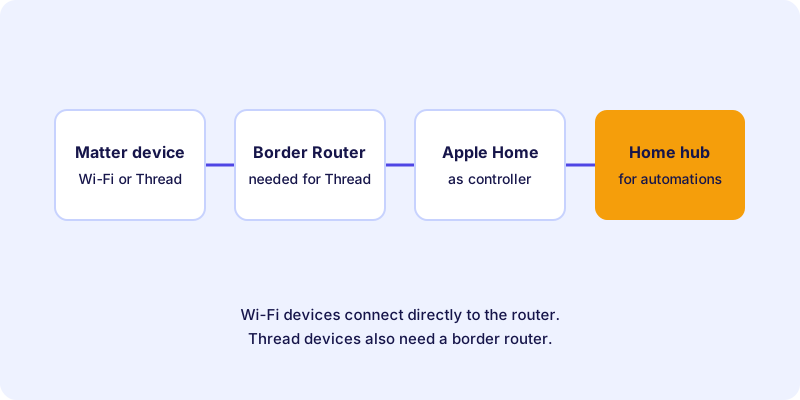
For Thread devices you also need a Thread border router. In an Apple Home setup, certain Apple devices can take on this role, such as a HomePod or an Apple TV, provided they support Thread. Check the current Apple documentation to see which devices are suitable for you. I explain the role of the router in the article Border router and controller.
An example of a Thread device that works with Apple Home is this smart plug from the directory:
The home hub: why Apple Home needs it
Apple Home works with a home hub as soon as you want to use automations or control your home while you are away. Without a home hub, these functions are limited. For simple control on your home network, the controller on the iPhone is often enough for Wi-Fi devices.
The home hub is often the same device that also provides the Thread connection. The Home app shows you which device takes on this role.
An example of an Apple Home hub that also serves as a Thread border router, depending on the model:
Setting up a Matter device in Apple Home: step by step
Apple changes labels and menus from time to time. The following guide describes the basic process. The labels in the app may differ. In that case, follow the instructions in the Home app and the manufacturer's guide.
How-to
Set up a Matter device in Apple Home
The basic process for adding a Matter device to your Apple Home setup.
Make sure your Home setup is in place. For Thread devices, a border router must also be reachable in the house.
Many devices are ready as soon as they are powered on. Others need a button press or repeated switching on and off. The exact procedure is in the manufacturer's guide.
Open the Home app and select the function for adding an accessory. The label may vary depending on the version.
Scan the QR code with the camera of the iPhone or enter the numeric code. Make sure the code is captured completely and without errors.
Give the device a unique name, such as “Floor lamp living room”, and assign it to a room. This makes voice commands and automations easier.
Turn the device off in the app and check its switch, if it has one. Only set up automations once the device responds reliably.
Limits and special features of Apple Home
Apple Home offers a clear interface and close integration with Siri. There are a few points you should know about:
- Not every function is displayed. The Home app supports certain device types and functions. A device may be able to do more than you can see in the app.
- Siri commands depend on names and rooms. Give devices unique names. Otherwise Siri may confuse similar devices.
- Automations run through the hub. Test a device on its own before you include it in an automation.
- Manufacturer differences remain. Individual manufacturers implement Matter features in different ways. For special functions, the manufacturer's guide helps.
Matter devices in Apple Home and other systems
A Matter device can be connected to several systems. This principle is called multi-admin. Apple Home and other controllers can then use the device in parallel, provided the device and the manufacturer support it. How many systems can be used at the same time depends on the manufacturer. I explain the details in the article Multi-admin: using one Matter device in several smart home systems.
Keep in mind that automations run per system. A rule in Apple Home does not take effect in another app, even if the device is connected there too.
Common setup problems
If a device cannot be added, the cause is often Bluetooth, the network, a missing border router or an old entry in another system. A detailed checklist with solutions is in the article Matter in Apple Home: Fix a Device That Won't Add. The article Fix Matter problems summarizes general causes.
Conclusion: Apple Home is a good fit for Matter
Apple Home is a full-featured Matter controller. For Thread devices you need a border router in your setup, and for automations and remote access a home hub. Prepare Bluetooth, permissions and the network, and the setup usually works on the first attempt. You can find suitable devices in the device directory. For how Matter relates to manufacturer systems, see the article Matter vs. proprietary ecosystems.
Frequently asked questions
Do I need a home hub for Matter in Apple Home?
Yes, for automations and for control while you are away. For simple control on your home network, the Home app on the iPhone is often enough for Wi-Fi devices. Thread devices also need a border router.
Which Apple devices can act as a Thread border router?
Certain Apple devices such as the HomePod or Apple TV can take on this role, provided they support Thread. The current Apple documentation shows which devices are suitable for you.
Can I use a Matter device in Apple Home and another app at the same time?
Yes, with multi-admin, if the device and the manufacturer support it. The number of systems that can be used at the same time depends on the manufacturer.
Why are some functions of my device missing in Apple Home?
The Home app only shows the device types and functions it supports. Additional functions are often only available in the manufacturer's app.
What do I do if the setup code cannot be scanned?
Check the lighting and the distance of the camera and try again. Alternatively, enter the 11-digit numeric code. If the code is damaged, the manufacturer can often help.