Series: Matter from A to Z · Part 3 of 8
Border Router and Controller: What Matter and Thread Need
Thread border router explained: what it does, what a Matter controller is and which devices you really need for Matter and Thread.
By Tobias ·· 6 min read
You've bought a Thread device, and suddenly the manual mentions a Thread border router. Is it necessary? Do you also need a controller? And what are these things anyway? These questions come up constantly with Matter and Thread, and the terms are often mixed up. The answer is manageable: a Thread border router connects the Thread radio network with your regular IP network. A controller is the system you use to set up and control Matter devices. Often both functions are built into a single device. Here you'll learn when you need which component.
What is a Thread border router?
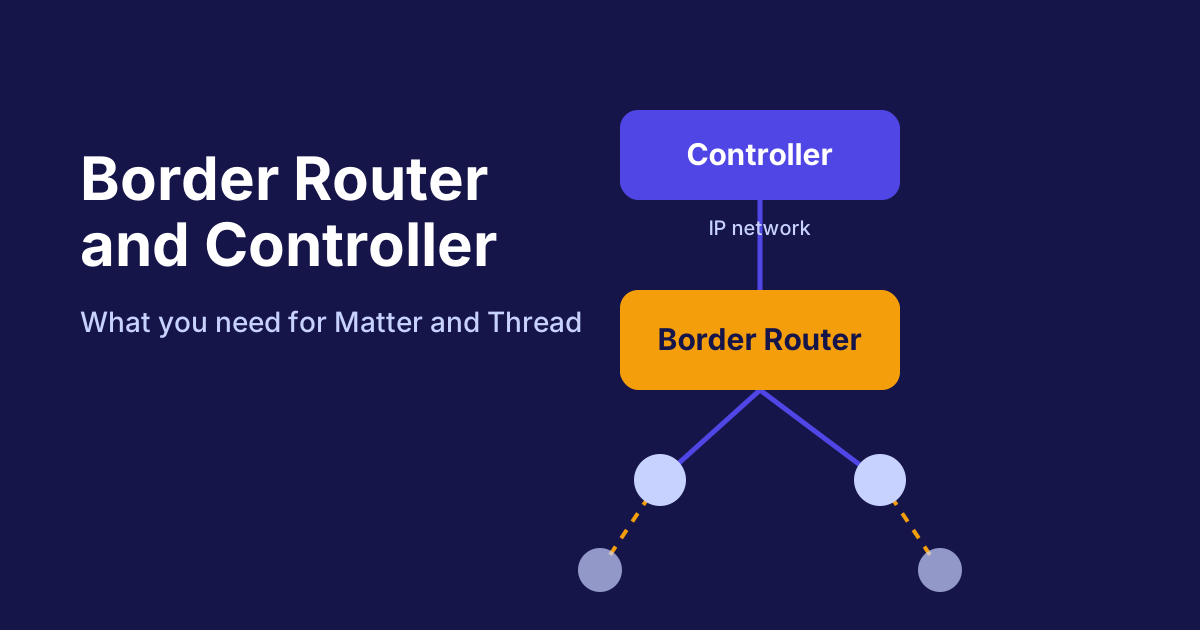
A Thread border router is a bridge between two networks. On one side is the Thread network, in which power-saving devices communicate with each other over radio. On the other side is your IP network, i.e. Wi-Fi and Ethernet, where routers, smartphones and control systems run.
Without this bridge, Thread devices cannot be reached directly from the rest of the network. The border router translates messages between the two worlds. This allows a controller to control a Thread device even though the device itself is not logged on to your Wi-Fi.
What is a controller?
The controller is the system that sets up and manages Matter devices and forwards commands. This includes access rights, automations such as "lights on at dusk", and control via app or voice command. In the narrower sense, a controller is therefore the control hub.
Important: the controller does not necessarily have to be in the same device as the border router. It only needs a way to reach the devices, and for Thread that path leads via the border router.
The path of a command
When you switch on the hallway light in the app, the command goes through several steps. The diagram shows the stations:
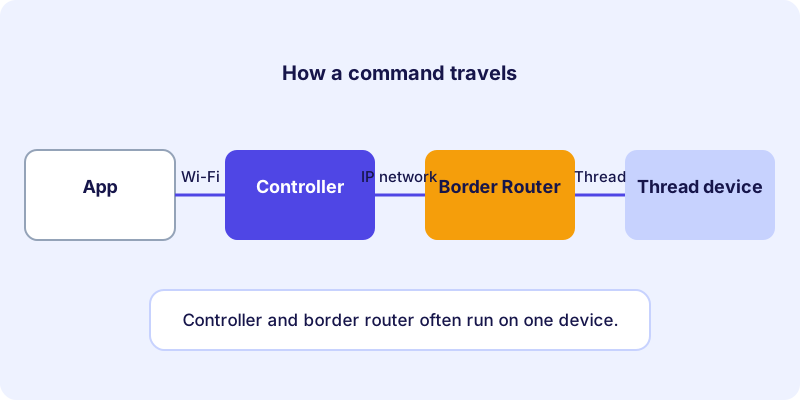
First you send the command from your smartphone. The controller receives it and forwards it over the IP network to the border router. The border router hands the message into the Thread network, where it reaches the device. The response takes the same path back.
Controller and border router: the difference
The two roles are often confused because they work closely together in everyday use. This diagram compares their tasks:
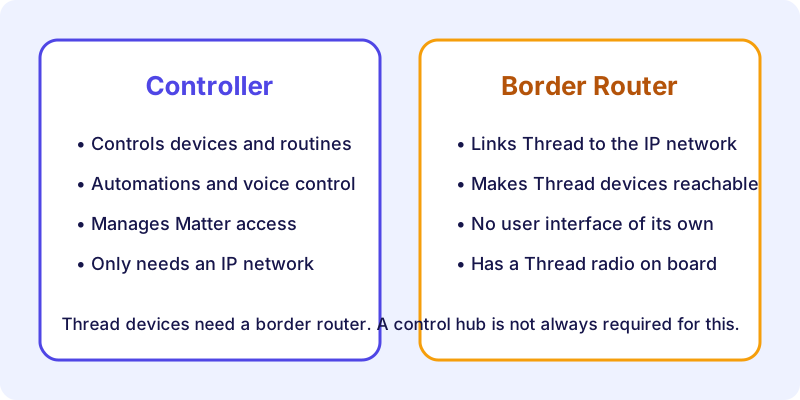
The controller is responsible for the logic. The border router takes care of the connection. One device can handle both roles, but it doesn't have to.
What you really need: a decision guide
You don't have to buy every component separately. These questions help with planning:
- Do you only have Matter devices connected via Wi-Fi or Ethernet? Then a controller is enough, such as a control hub or hub with Matter support. You don't need a border router.
- Do you have Thread devices, for example motion sensors or contact sensors? Then you need a border router. It can be built into a hub, a control hub or another device that supports Thread.
- Do you already have a controller that supports Thread? Then the border router is usually already there. Check this in your system's specifications.
- Do you use several systems? Then it can make sense to plan the connection of your Thread devices carefully. How multiple border routers work together depends on the implementation in question.
An example of a Thread device that needs a border router is this motion sensor:
Three typical setups
Only lamps and plugs over Wi-Fi: A controller is enough. You don't need a border router, because all devices connect directly to the IP network.
Motion sensors and window sensors over Thread: Here you need a border router. If it sits in your control hub, everything runs through one device. Without it, the sensors remain out of reach.
Several systems in the household: Each system needs its own access to the devices. How the Thread connection is shared depends on the specific implementation. Check in advance which system provides the Thread bridge.
How to recognize a border router
A border router is not always labelled as such. In the data sheet or product description, you will often find "Thread" or "Thread Border Router". Many hubs, control hubs and some smart speakers or streaming devices include this function. Not all of them do, and not every model within a product line is equipped the same way. So always check the specific model.
An example of an Apple Home hub that, depending on the model, also serves as a Thread border router:
If you run Home Assistant and want your own hub for Zigbee and Thread, network coordinators such as this one offer an alternative that connects to your home network via Ethernet (check the feature set in the manufacturer's information):
Pitfalls during setup
Some mistakes come up again and again:
- The border router is missing. Thread devices then cannot be added, even though Bluetooth and Matter work perfectly.
- The border router is too far away. Thread is robust, but there needs to be a connection between the Thread network and the border router. Place it where it is easy to reach.
- The device is already set up elsewhere. A Matter device often has to be reset before it appears in a new system.
- The expectation is wrong. A border router does not replace a controller. It only establishes the connection.
Conclusion: what you need for Matter and Thread
For Matter and Thread you need two roles: a controller that manages your devices, and a border router as soon as Thread devices are involved. Often both functions are combined in one device. Practical tip: before buying a Thread device, check whether you already have a border router. If not, choose a system that includes this function and check the details in the data sheet. You'll find a good overview of Matter-compatible devices in the device directory. For background on the radio technologies, read the article Thread, Wi-Fi or Ethernet.
Frequently asked questions
Do I need a Thread border router for every Matter device?
No. Only devices connected via Thread need a border router. Matter devices connected via Wi-Fi or Ethernet do not.
Is a border router the same as a controller?
No. The border router connects the Thread network to the IP network. The controller sets up devices and controls them. Both functions can, however, be built into a single device.
Can I add a border router later?
Yes, by adding an extra device with Thread support to your network. Make sure it works with your control system.
How do I know whether my device supports Thread?
The data sheet or product description states which radio technologies a device uses. In the device directory, the supported connections are listed for each device.