Series: Matter from A to Z · Part 7 of 8
Matter Bridge Explained: Connecting Zigbee and Other Devices
Matter bridge explained: how to connect Zigbee and other devices to Matter through a bridge, what works, where the limits are and what to check.
By Tobias ·· 6 min read
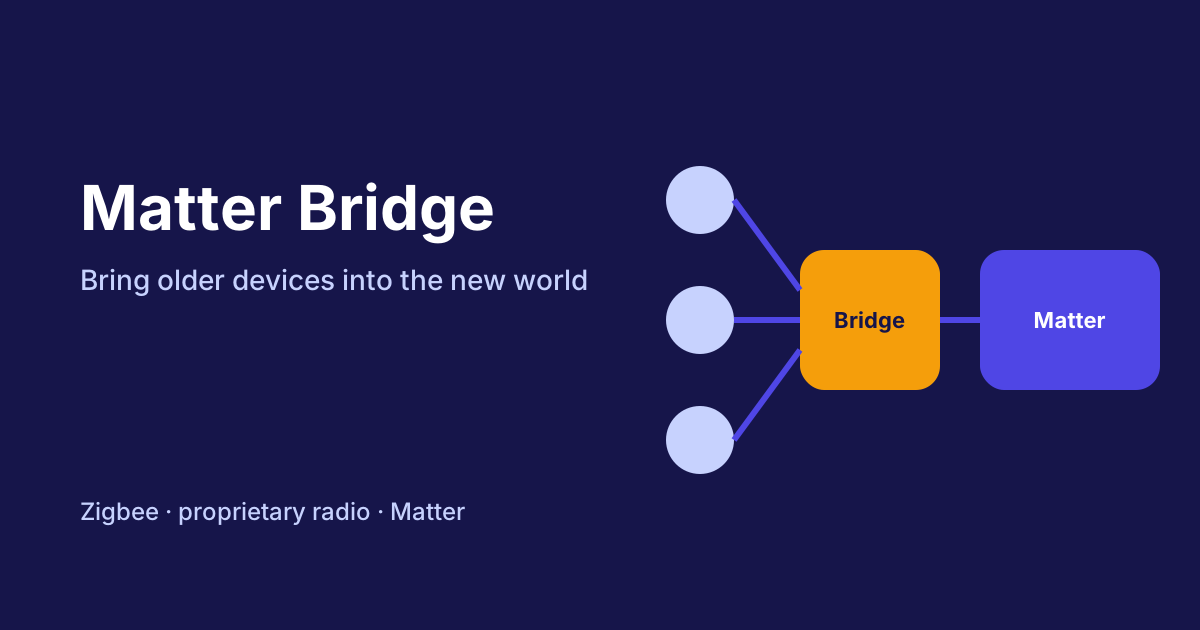
A Matter bridge is the link between older and newer technology. It takes in devices that don't speak Matter directly, such as Zigbee sensors or devices using a proprietary radio, and makes them available to a Matter system as Matter devices. This means you don't have to rebuild your existing home right away. Here you'll learn how a Matter bridge works, which devices can be connected, where the limits lie and what to look for when buying.
The basics of the standard are explained in the article What Is Matter?. The differences between Zigbee and Matter are shown in the article Matter vs Zigbee Compared.
Matter bridge: what it actually does
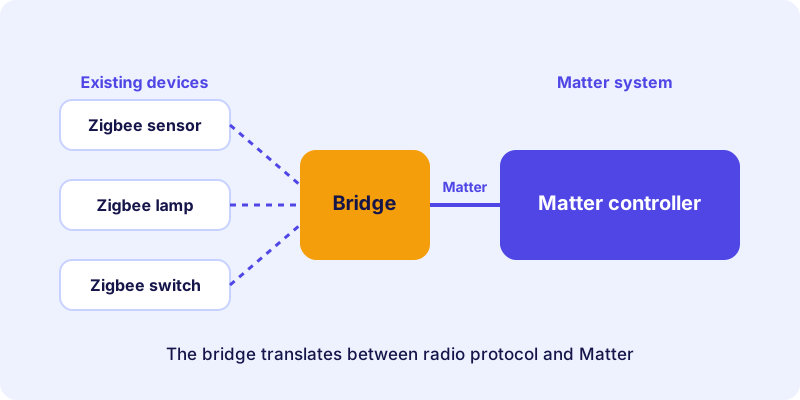
A bridge works at the interface between two worlds. On one side it speaks the radio protocol of your existing devices, such as Zigbee. On the other side it registers these devices in the Matter network. For your control system, the devices then look as if they were native Matter devices.
The Matter specification has a concept for this: bridged devices, meaning devices that can be reached through a bridge. In the device directory on matter.tips, such bridges appear in the device group "Bridges & Border Routers", or as a bridge or hub. The device itself acts as the intermediary, not as the end point.
Bridge, gateway and controller: the terms compared
In everyday use the terms are often mixed up. A short classification helps:
| Term | Task | Example |
|---|---|---|
| Matter bridge | Integrates devices of other protocols into Matter | Bridge for Zigbee devices |
| Gateway | Manages its own radio network and makes it available | Zigbee coordinator |
| Controller | Controls Matter devices in the home network | Control hub with Matter support |
In practice the boundaries are blurred. Some hubs take on several tasks at once. What matters is that you check which role the device plays in your setup.
Which devices can be connected
Typical candidates for a bridge are devices that already run in an existing radio network:
- Zigbee lamps, sensors and switches: The most common setup, because Zigbee is widespread in the smart home.
- Devices with proprietary radio networks: Depending on the bridge, some systems can be connected and others cannot.
- Devices with a Bluetooth connection: Here, too, it depends on the product whether a bridge can take them on.
Which devices are actually supported is stated in the bridge manufacturer's specifications. A general statement such as "Zigbee always works" would be too sweeping.
How to set up a bridge
Setup usually runs in three steps. The exact steps are in the manufacturer's manual, but the principle is similar:
- Connect the bridge to the network: Connect it to your home network via Ethernet or Wi-Fi. Many bridges offer their own app for the initial setup.
- Pair existing devices with the bridge: Your Zigbee sensor or lamp is registered with the bridge before it appears in the Matter network.
- Add the bridge in the Matter system: In your control system, you add the bridge like a Matter device. The connected devices then appear, usually as individual entries.
Make sure you pair the devices with the bridge and not in the Matter system. The Matter system only sees the devices once the bridge already manages them.
What a bridge cannot do
A bridge translates, and every translation has a cost. You should know these limits:
- Not all functions come through. Some special functions of a device are not available via Matter.
- Response times can change. Every additional station on the path can increase the delay.
- The bridge is a bottleneck. If it fails, the connected devices are usually unreachable, even if they work fine on their own.
- Updates depend on two manufacturers. Both the bridge and the original device determine what is possible.
These points do not argue against bridges. They do show, however, that a bridge is a deliberate decision and not a replacement for devices with native Matter support.
When a bridge is worthwhile
A bridge is particularly suitable in these situations:
- You have many working Zigbee devices and don't want to replace them.
- You want to try out a new Matter system without rebuilding everything.
- You want to control mixed devices in a single app.
If you are starting from scratch, it is often more sensible to buy Matter devices directly. This avoids an extra component in the network. More on finding suitable devices is explained in the article How to Buy Matter Devices.
What to look for when buying a bridge
Before buying, take a look at these points:
- Supported devices: Does the data sheet state which protocols and device types the bridge takes on?
- Connection: Ethernet is usually more stable than Wi-Fi if the bridge stays in one place.
- Matter certification: Check in the device directory whether the bridge is certified as a Matter device.
- Compatibility: Is the bridge approved for the control system you want to use?
An example of a bridge that connects Zigbee devices is this Zigbee bridge. Whether and how many devices it supports is stated in the manufacturer's product description.
Conclusion: a bridge as a transition
A Matter bridge is a useful tool if you want to keep using existing devices. It connects two worlds, but it does not replace native Matter support. Plan it deliberately, test functions before converting and check that it suits your devices. The overall picture, including controller and border router, is explained in the article Border Router and Controller. If you want to use devices in several systems at the same time, the article Matter Multi-Admin: One Device, Several Smart Home Systems will help.
Frequently asked questions
What is a Matter bridge?
A Matter bridge is a device that integrates devices of other protocols, such as Zigbee, into a Matter system. For the control system, the devices then appear as Matter devices.
Can I use Zigbee devices in Matter without a bridge?
Not directly. Zigbee devices do not speak Matter. They need a bridge, a gateway or a device that connects both worlds.
What happens if the bridge fails?
The connected devices are usually no longer reachable, even if they work on their own. That's why the bridge is an important part of your setup.
Do devices lose functions when connected through a bridge?
That can happen. Not every special function of a device is transferred via Matter. Check in advance which functions your system supports through the bridge.
Is a bridge the same as a controller?
No. A bridge makes devices available, while a controller controls Matter devices. Some products can take on both roles, depending on the device.