Matter with Amazon Alexa: What Works and What Doesn't
Set up Matter with Amazon Alexa: requirements, Echo as Thread border router, routines and limits. See what works well with Alexa and where it falls short.
By Tobias ·· 6 min read
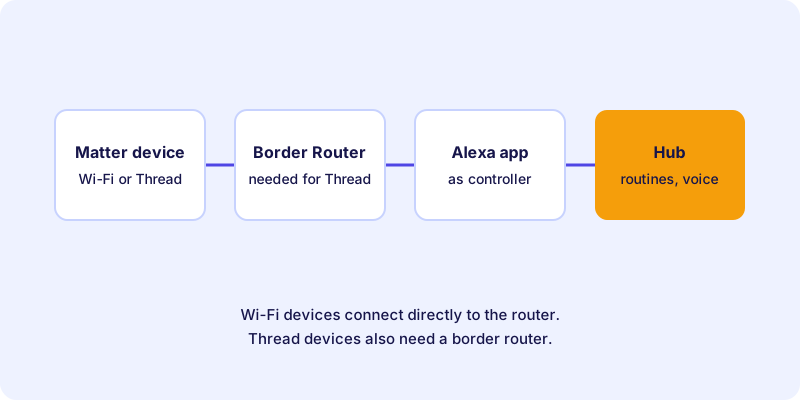
Matter with Amazon Alexa is the obvious route for many households, because Alexa is already in use on Echo speakers and displays. Alexa is a Matter controller. You add Matter devices in the Alexa app, control them by voice and include them in routines. Thread devices also need a Thread border router. This article shows what you should prepare, how the setup works, and what works well with Alexa and where it falls short.
The basics of Matter are explained in the article What is Matter?. The general setup process is described in the article Set up a Matter device: step by step to a finished device.
What you need for Matter with Alexa
For the setup you need:
- An Amazon account and the Alexa app on your smartphone. You manage devices, rooms and routines there.
- Bluetooth and permissions. The app needs access to Bluetooth and the local network. Allow access when you are asked.
- The setup code of the device, as a QR code or a numeric code.
- A border router for Thread devices. Certain Echo devices can take on this role. Whether your model is one of them is stated in Amazon's documentation.
As an example of a Thread device from the directory, here is a light strip. It is connected via Thread and works well with voice commands:
Wi-Fi devices do not need a border router. They connect directly to your router. I explain the difference between the radio technologies in the article Thread, Wi-Fi or Ethernet.
The role of the Echo devices
With Alexa, Echo speakers and displays fulfill two tasks. They serve as the voice interface, and some models can work as a Thread border router. A border router connects the Thread network with your home network. Without it, Thread devices remain unreachable for Alexa.
An example of an Echo device that can serve as a border router, depending on the model:
Make sure your border router is switched on and connected to your home network. If it is on a different floor from the device, it can help to run the setup near it.
Setting up a Matter device in Alexa: step by step
Amazon regularly changes the interface of the Alexa app. The following steps describe the basic process. The exact menu names may differ on your device. In that case, follow the app and the manufacturer's guide.
How-to
Set up a Matter device in Alexa
The basic process for adding a Matter device in the Alexa app.
Make sure a suitable Echo border router is switched on in the house and connected to your home network. For Wi-Fi devices, this step does not apply.
Many devices are ready as soon as they are powered on. Others need a button press or repeated switching on and off. The exact procedure is in the manufacturer's guide.
Open the Alexa app and select the function to add a device. Choose the option for Matter. The labels may differ depending on the app version.
Scan the QR code with the camera of the smartphone or enter the numeric code. Watch for typos, because a wrong code cancels the process.
Give the device a unique name, such as “Desk lamp office”, and assign it to a room. This makes voice commands unambiguous.
Control the device once in the app and once by voice. Only then set up routines.
What works well with Alexa and what doesn't
Alexa is well suited to everyday use if you know its limits. This overview helps you assess it:
| Area | Assessment |
|---|---|
| Switching lamps and plugs | Usually reliable, as long as the device is online |
| Dimming and color control | Mostly good, scope depends on the device |
| Sensors such as motion detectors | Depends on the device type and how it is shown in the app |
| Devices with many manufacturer functions | Often only some of the functions are available in Alexa |
| Routines with several devices | Works well if names and rooms are kept tidy |
The table describes typical experiences. Whether a certain range of functions is available for your device is shown in the Alexa app or in the manufacturer's guide. If you are unsure about special functions, check them in the device directory before you buy.
Multi-admin: one device in Alexa and other systems
Many Matter devices can be connected to several systems at the same time. This principle is called multi-admin. Alexa can work as one of several controllers. How many systems a device can manage in parallel is decided by the manufacturer. The essentials are in the article Multi-admin: using one Matter device in several smart home systems.
Routines only work in the system where you created them. A routine in Alexa therefore does not automatically control a device that is connected in another app.
Stumbling blocks during setup
If a device is not found in the Alexa app, the cause is usually Bluetooth, the network, the border router or an old entry in another system. A checklist with solutions is in the article Matter and Alexa: Device Not Found? Here's What Helps. General guidance is in the article Fix Matter problems.
Conclusion: Alexa is worth it for simple Matter devices
Alexa connects Matter devices reliably when Bluetooth, the network and, if needed, the border router are in order. Simple devices such as plugs and lamps usually work well. For more complex devices, check the range of functions before you buy. You can find suitable devices in the device directory. For how Matter relates to manufacturer systems, see the article Matter vs. proprietary ecosystems.
Frequently asked questions
Do I need an Echo speaker for Matter in Alexa?
Not necessarily. Alexa routines and voice control do require an Alexa-enabled speaker or display, though. Thread devices also need a border router.
Which Echo devices can act as a Thread border router?
Certain Echo models support Thread and can take on this role. Which models are suitable is stated in Amazon's current documentation.
Do all functions of a Matter device work in Alexa?
Not necessarily. Simple functions such as switching and dimming usually work well. Manufacturer-specific extra functions are often only available in the manufacturer's app.
Can I use a Matter device in Alexa and in another system at the same time?
Yes, with multi-admin, if the device and the manufacturer support it. The number of systems in parallel depends on the manufacturer.
What do I do if Alexa cannot find my Matter device?
First check Bluetooth, the Wi-Fi band and the border router. Remove the device from any other system and, if necessary, reset it according to the manufacturer's instructions.