Matter and Home Assistant: How to Add Matter Devices
Matter Home Assistant setup: Matter server, Thread border router and integration. Add your Matter devices step by step.
By Tobias ·· 7 min read
Matter and Home Assistant is a combination that fits together well. Home Assistant is open-source smart home software that you run on your own hardware. With the Matter integration you can add Matter devices to this system and control them locally. Here I explain how this works, which building blocks you need and where mistakes commonly happen. A general description of setting up a single device is in the article Set Up a Matter Device: Step by Step to a Working Device.
What you need for Matter in Home Assistant
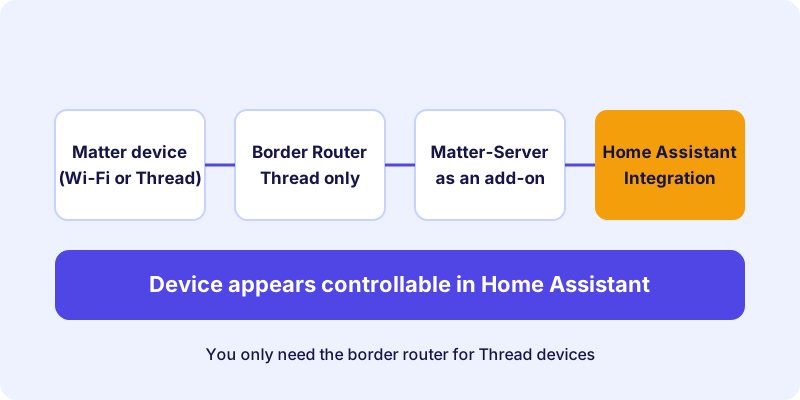
Several components are involved in getting Matter working in Home Assistant. They work together, and each has its own task:
- Home Assistant itself: The control hub where your devices, automations and dashboards live.
- Matter server: A service that handles Matter communication. Home Assistant uses it to find and control devices.
- The Matter integration: The connection within Home Assistant through which you add and manage devices.
- A Thread border router: Only needed if you use Thread devices. It connects the Thread network to your home network.
How you install the Matter server depends on your type of Home Assistant installation. On the common installations, for example with the Supervisor, it is usually offered as an add-on. With other installation types it runs as a separate container. You can tell which option applies to you from the details of your installation.
An example of a ready-made Home Assistant hub:
Setting up Matter in Home Assistant: how it works
The exact steps can change with new versions of Home Assistant. The following instructions describe the basic process that applies in recent versions. Labels may differ, so if you're unsure, follow the official documentation.
How-to
Set up the Matter integration in Home Assistant
The basic process for adding Matter devices to Home Assistant.
Find out how Home Assistant runs on your system. This determines where you install the Matter server. You'll find the details in your system's installation overview.
Install the Matter server as an add-on or as a container. Then start it and check that it runs without error messages.
If your devices connect via Thread, set up a border router. This can be an add-on with a suitable radio stick or a device on the network.
In Home Assistant, open the settings, choose devices and services and add a new integration. Search for Matter and follow the instructions.
Scan the device's Matter code with your smartphone camera or enter the numeric code. The setup then connects the device to the Matter server.
Give the devices meaningful names and assign them to areas. That makes them quicker to find later in dashboards and automations.
Switch the device once from Home Assistant and check that it reacts immediately. Then set up the automations you want.
The Matter server: the heart of the setup
The Matter server is the most important component, because it maintains the connection to your devices. If it isn't running, Matter devices in Home Assistant are unusable, even when the integration is set up correctly. So if a device doesn't respond, check first whether the service is active.
Restarting the Matter server solves many problems that occur after an update or a power outage. Also keep your installation up to date, because improvements to Matter support often arrive through updates.
Thread and the border router
For Thread devices, the border router is crucial. Without it, these devices cannot reach your home network, no matter how well the Matter server is set up. The basics are explained in the article Border Router and Controller and in the article about Thread, Wi-Fi or Ethernet.
If you already run a Thread border router in another system, the Thread network credentials can often be carried over. Whether this is possible for your device depends on the software and the manufacturer. Check this before you make changes, so your Thread devices don't have to be set up again unnecessarily.
An example of a USB stick that connects Zigbee and Thread to Home Assistant:
Typical problems in practice
Some stumbling blocks come up particularly often with Home Assistant:
- The Matter server isn't running. The integration then reports connection errors. Check the status of the service and its logs.
- Thread devices aren't found. Often the border router is missing or is not connected to the correct network.
- A device is already in another system. Reset or remove it there before adding it again.
- Wi-Fi devices can't find the network. Many devices only support the 2.4 GHz band.
You'll find further solutions to setup problems in the article Fixing Matter problems.
Matter in Home Assistant and other systems
A Matter device can often be used in several systems at the same time, provided the manufacturer and the device support it. This principle is called multi-admin. Whether it makes sense for your setup is explained in the article Matter Multi-Admin: One Device, Several Smart Home Systems.
Keep in mind that automations run per system. A rule in Home Assistant does not automatically take effect in another app, even if the device is also connected there.
Local control, even without the cloud
A major advantage of Home Assistant with Matter is local control. Commands run over your home network and not via a server on the internet. This brings shorter response times and more independence. For remote access or certain services, however, you still need a connection to the outside, which you set up deliberately.
Conclusion: Matter in Home Assistant is worth it
Matter and Home Assistant complement each other well. The Matter server, the integration and, for Thread devices, the border router form the foundation. Set up the building blocks in order, test each device after adding it and keep your software up to date. You'll find suitable devices in the device directory. For an introduction to the basics, read the article What Is Matter?.
Frequently asked questions
Do I need a Matter server for Matter in Home Assistant?
Yes. The Matter server handles communication with the devices. Depending on your installation type, it runs as an add-on or as a separate container.
Do I need a Thread border router for Home Assistant?
Only if you use Thread devices. Wi-Fi devices connect directly to the network and don't need a border router.
Where do I find the Matter integration in Home Assistant?
You'll find the integration in the settings under devices and services, where you can add new integrations. The exact label can vary by version.
Does Matter in Home Assistant work without internet?
Local control over your home network works without internet. Remote access and some services, however, require a connection to the outside.
Why doesn't my Matter device show up in Home Assistant?
Common causes are a Matter server that isn't running, a missing border router for Thread devices, or a device that is still linked to another system.